Whether you need to include time logs, before-and-after photos, service details, or signed agreements, supporting documents help your customers review and pay faster — without extra follow-up.
With Autobooks Invoicing, you can now attach documents directly to invoices, all from within your financial institution’s online banking.
Why attach documents to invoices?
Adding attachments gives your customers everything they need in one place:
- Fewer questions and follow‑ups: Share details up front so customers don’t have to ask for clarification.
- Clearer documentation: Include proof of work, breakdowns, or agreements alongside the invoice.
- A smoother path to payment: When customers can review everything at once, they’re better equipped to pay on time.
What you can attach
Invoice attachments are flexible enough to support a variety of business needs. Common examples include:
- Time logs or hours worked
- Service or project details
- Before‑and‑after photos
- Signed agreements or proposals
- Spreadsheets or supporting documents
File types supported are images, PDF, Word, Excel, CSV, PowerPoint, and RTF files.
How to attach documents to an invoice
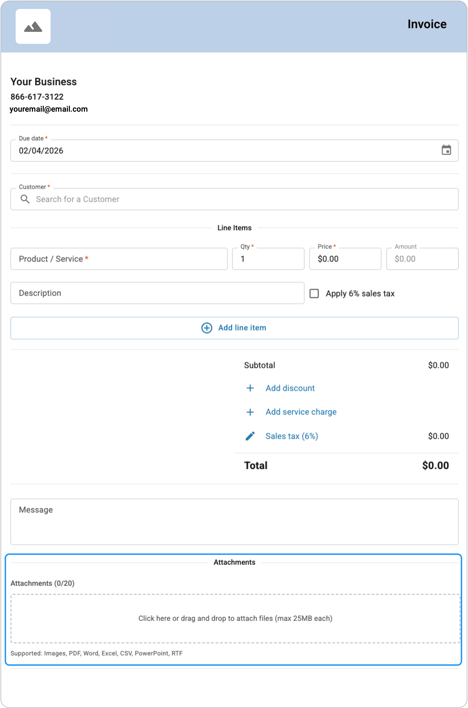
Attaching documents is built directly into the invoice workflow.
- Create a new invoice using the Advanced Builder template.
- Scroll to the Attachments section at the bottom of the invoice.
- Add your files by dragging and dropping them into the attachments area, or by clicking the attachments box to upload files from your device.
- Finish and send your invoice — your attachments will be included automatically.
There’s no need to send documents separately or follow up later. Everything your customer needs arrives together.
Keep everything in one place
By attaching documents while creating your invoice, you can keep billing and supporting details together in a single step. That means fewer emails back and forth, less time tracking down information, and everything your customer needs to review and pay arrives at once.
Ready to include documents with your invoices?
Invoice attachments are available directly within Autobooks Invoicing, inside your financial institution’s online banking. Create an invoice, add the supporting documents you need, and send everything together — so you can reduce follow-up and keep invoicing moving forward.
| Want help getting started? Visit the Autobooks Support Center for step-by-step guidance or reach out to support if you have questions. |