Whether you’re raising money for a nonprofit, organizing a community fundraiser, supporting a cause, or rallying help for a project — collecting donations should be simple. Autobooks makes that possible with two flexible tools you can use right inside your financial institution account:
- Checkout Pages
- Your Payment Link
Each tool can provide different types of donation experiences for supporters. Below, we’ll break down when each one shines — along with practical tips to help you make the most of every opportunity to receive support.
1. When Checkout Pages Are Perfect
Checkout Pages give supporters a clear, guided donation experience. They’re especially effective when you want donors to choose from preset giving amounts or sponsorship levels.
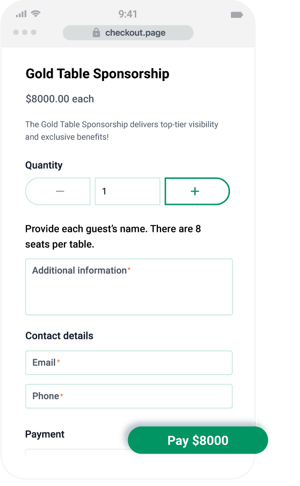
Use Checkout Pages when:
- You want to offer preset donation amounts.
Ideal for campaigns, events, sponsorships, or any scenario where you want to take the guess work out of a donation.
- You prefer to accept card donations only.
Checkout Pages accept card payments only, making it easy to accept donations without keeping track of cash.
- You want a donation checkout experience you can embed or share.
Add your Checkout Page link to your website, social media, or email — or print and post the built-in QR code at in-person events.
- You want to collect donor information.
Checkout Pages give you the option to capture address details, which makes follow-up communication easy.
Pro tips for using Checkout Pages effectively:
- Use Checkout Pages for campaigns with fixed tiers.
When amounts are already defined — like $25, $50, $100, or specific sponsorship packages — Checkout Pages remove guesswork and speed up giving.
- Make it easy for volunteers to collect donations.
Share your Checkout Page link or QR code with anyone helping you raise funds, making it simple to mobilize your team.
- Print and post your QR codes at events.
Great for holiday drives, community gatherings, and anywhere you want donors to give on the spot.
2. When Your Payment Link Is Perfect
Your Payment Link is the most flexible way to accept donations. Supporters can enter any amount they choose, making it perfect for general fundraising and everyday donation opportunities.
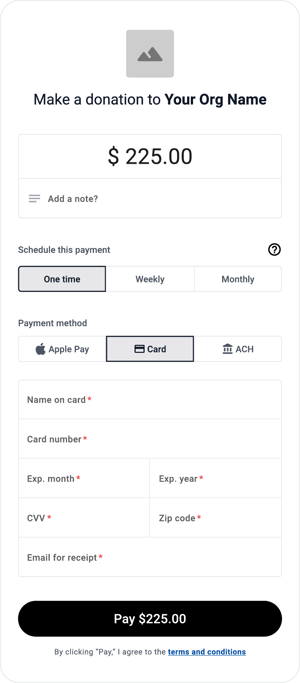
Use your Payment Link when:
- You want donors to contribute any amount.
Great for “give what you can” campaigns or open-ended fundraisers.
- You want to accept both card and ACH donations.
Supporters can choose the payment method that works best for them. - You want to collect donations of any amount wherever you communicate with supporters.
Send your Payment Link through text, email, social media, or messaging apps — or add it to your website and email signature. - You need a simple way to take donations in person or over the phone.
Enter the donation on behalf of a supporter anytime you’re speaking with them.
Pro tips for using your Payment Link effectively:
- Keep your Payment Link handy for spontaneous giving.
Conversations with potential donors often turn into immediate opportunities — your link lets you act on them instantly.
- Share your link broadly across communication channels.
The more places your link appears, the easier you make it for supporters to contribute.
- Use your link when flexibility matters most.
For causes without preset tiers, or when you simply want donors to give any amount they feel inspired to give.
Which tool should you choose?
Both tools are powerful — and many organizations use them together. Here’s a quick guide to help you decide:
|
If you want… |
Checkout Pages |
Payment Link |
|
Donors to pick from preset amounts |
✔️ |
|
|
Donors to give any amount they choose |
|
✔️ |
|
A card-only donation experience |
✔️ |
|
|
To accept both card and ACH |
|
✔️ |
|
Easy QR codes for events |
✔️ |
✔️ |
|
To enter donations on behalf of donors |
|
✔️ |
Have a question or need some help?
We're here for you. Check out our support center for more information about payment processing with Autobooks, or click here to submit a support ticket.